


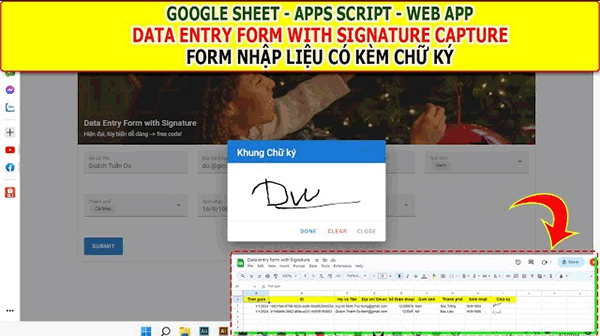
Giaoan.link chia sẻ đến các bạn một project về Google sheet App script – Nhập liệu có chữ ký – Data entry form with Signature Capture. Khác biệt với các form nhập liệu trước, ở form nhập liệu này có thêm chức năng ký tên trực tiếp trên cửa sổ trình duyệt. Với chức năng khá thú vị này, bạn có thể ứng dụng vào những việc cụ thể theo yêu cầu của bạn. Dưới đây là code apps script và video hướng dẫn cụ thể.
Xem các project excel ứng dụng khác:
- Giới thiệu Web Manager – Giải pháp Quản lý Liên kết Tập trung Thông minh
- Tạo form online Hướng dẫn sử dụng Công cụ Load bảng dữ liệu
- TẠO FORM ONLINE – TÙY BIẾN GIAO DIỆN ĐỈNH CAO & XUẤT CODE THÔNG MINH! 🎉
- Bài tập thực hành Msword
- Giới thiệu Ứng dụng Khảo sát và Vẽ đồ thị Hàm số Tự động
- Google sheet Webapp Hệ thống Gửi và Phê duyệt Hỗ trợ file Pdf Xem và đính chữ ký
- Form Builder | Trình tạo form nhập liệu nhanh chóng – Bản V1
- Appscript Webapp | Kéo thả các Items theo 2 chiều Dọc – Ngang, Ứng dụng sắp xếp chu trình công việc
- GOOGLE SHEET WEBAPP TRA CỨU 34 TỈNH THÀNH VIỆT NAM MỚI NHẤT (SÁP NHẬP 2025)
- Quản Lý Tài Chính Cá Nhân Hiệu Quả Với Web App Google Apps Script
Code của file “Coge.gs”
const SETTINGS = {
  APP_NAME: "Data Entry Form with Signature",
  SHEET_NAME: {
    RESPONSES: "Data"
  },
  HEADERS: [
    { key: "timestamp", value: "Thời gian" },
    { key: "id", value: "ID" },
    { key: "name", value: "Họ và Tên" },
    { key: "email", value: "Địa chỉ Email" },
    { key: "phone", value: "Số Điện thoại" },
    { key: "gender", value: "Giới tính" },
    { key: "city", value: "Thành phố" },
    { key: "date", value: "Sinh nhật" },
    { key: "signature", value: "Chữ ký" },
  ]
}

function link(filename) {
  return HtmlService.createTemplateFromFile(filename).evaluate().getContent()
}

function doGet() {
  return HtmlService.createTemplateFromFile("index.html")
    .evaluate()
    .setTitle(SETTINGS.APP_NAME)
    .setXFrameOptionsMode(HtmlService.XFrameOptionsMode.ALLOWALL)
}

function submit(data) {
  data = JSON.parse(data)
  const headers = SETTINGS.HEADERS.map(({value}) => value)
  const id = Utilities.getUuid()
  const signatures = []
  const values = SETTINGS.HEADERS.map(({key}, index) => {
    if (key === "id") return id
    if (key === "timestamp") return new Date()
    if (!key in data) return null
    if (Array.isArray(data[key])) return data[key].join(",")
    if (data[key].startsWith("data:image")) {
      signatures.push(index)
      return SpreadsheetApp.newCellImage().setSourceUrl(data[key]).build().toBuilder()
    }
    return data[key]
  })
  const ws = SpreadsheetApp.getActive().getSheetByName(SETTINGS.SHEET_NAME.RESPONSES) || SpreadsheetApp.getActive().insertSheet(SETTINGS.SHEET_NAME.RESPONSES)
  ws.getRange(1,1, 1, headers.length).setValues([headers])
  const lastRow = ws.getLastRow()
  ws.getRange(lastRow + 1, 1, 1, values.length).setValues([values])
  signatures.forEach(index => {
    ws.getRange(lastRow + 1, index + 1).setValue(values[index])
  })
  return JSON.stringify({success: true, message: `Cám ơn bạn đã gửi! ID: ${id}`})
}
Code file “index.html”
<!DOCTYPE html>
<html>

<head>
  <base target="_top">
  <link href="https://fonts.googleapis.com/css?family=Roboto:100,300,400,500,700,900" rel="stylesheet">
  <link href="https://cdn.jsdelivr.net/npm/@mdi/font@6.x/css/materialdesignicons.min.css" rel="stylesheet">
  <link href="https://cdn.jsdelivr.net/npm/vuetify@2.x/dist/vuetify.min.css" rel="stylesheet">
  <meta name="viewport" content="width=device-width, initial-scale=1, maximum-scale=1, user-scalable=no, minimal-ui">
</head>

<body>
  <div id="app">
    <v-app>
      <v-main>
        <v-container>
          <v-form ref="form" @submit.prevent="submit" :disabled="loading">
            <v-card :loading="loading" outlined>
              <v-img class="white--text align-end" height="200px" src="https://source.unsplash.com/random">
                <v-card-title>{{ title }}</v-card-title>
                <v-card-subtitle v-if="subtitle">{{ subtitle }}</v-card-subtitle>
              </v-img>
              <v-card-text>
                <v-row>
                  <v-col cols="12" sm="12" md="6" lg="3" xl="4">
                    <my-input :item="form.name"></my-input>
                  </v-col>
                  <v-col cols="12" sm="12" md="6" lg="3" xl="4">
                    <my-input :item="form.email"></my-input>
                  </v-col>
                  <v-col cols="12" sm="12" md="6" lg="3" xl="4">
                    <my-input :item="form.phone"></my-input>
                  </v-col>
                  <v-col cols="12" sm="12" md="6" lg="3" xl="43">
                    <my-input :item="form.gender"></my-input>
                  </v-col>
                  <v-col cols="12" sm="12" md="6" lg="3" xl="4">
                    <my-input :item="form.city"></my-input>
                  </v-col>
                  <v-col cols="12" sm="12" md="6" lg="3" xl="4">
                    <my-input :item="form.date" ></my-input>
                  </v-col>
                  <v-col cols="12" sm="12" md="6" lg="3" xl="4">
                    <my-input :item="form.signature"></my-input>
                  </v-col>
                  <v-col cols="12">
                    <v-btn type="submit" color="primary" :disabled="loading" large depressed>Submit</v-btn>
                  </v-col>
                </v-row>
              </v-card-text>
          </v-form>
          <v-snackbar v-model="snackbar.show" :color="snackbar.color" bottom>
            {{ snackbar.message }}
            <template v-slot:action="{ attrs }">
              <v-btn color="white" text v-bind="attrs" :timeout="snackbar.timeout" @click="snackbar.show = false">
                <v-icon>mdi-close</v-icon>
              </v-btn>
            </template>
          </v-snackbar>
        </v-container>
      </v-main>
    </v-app>
  </div>

  <?!= link("Javascript.html"); ?>
</body>

</html>
Code file “Javascript.html”
<script src="https://cdn.jsdelivr.net/npm/signature_pad@2.3.2/dist/signature_pad.min.js"></script>
<script src="https://cdn.jsdelivr.net/npm/vue@2.x/dist/vue.js"></script>
<script src="https://cdn.jsdelivr.net/npm/vuetify@2.x/dist/vuetify.js"></script>
<script>
  const apiCall = function (functionName, params = {}) {
  params = JSON.stringify(params);
  return new Promise((resolve, reject) => {
    google.script.run
      .withSuccessHandler((response) => resolve(JSON.parse(response)))
      .withFailureHandler((error) => reject(error))
      [functionName](params);
  });
};

const getFormData = (form) => {
  const data = {};
  Object.entries(form).forEach(([key, item]) => {
    data[key] = item.value;
  });
  return data
};

const form = {
  name: {
    label: "Họ và Tên",
    type: "text",
    value: "",
    disabled: false,
    placeholder: "",
    rules: [(v) => !!v || "This is required!"],
  },
  email: {
    label: "Địa chỉ Email",
    type: "email",
    value: "",
    disabled: false,
    placeholder: "",
    rules: [(v) => !!v || "This is required!"],
  },
  phone: {
    label: "Số điện thoại",
    type: "tel",
    value: "",
    disabled: false,
    placeholder: "",
    rules: [(v) => !!v || "This is required!"],
  },
  gender: {
    label: "Giới tính",
    type: "select",
    value: "",
    items: ["Nam", "Nữ", "Other"],
    disabled: false,
    placeholder: "",
    rules: [(v) => !!v || "This is required!"],
  },
  city: {
    label: "Thành phố",
    type: "select",
    value: "",
    items: ["Cà Mau", "Bạc Liêu", "Sóc Trăng", "Cần Thơ", "Tiền Giang"],
    disabled: false,
    placeholder: "",
    rules: [(v) => !!v || "This is required!"],
  },
  date: {
    label: "Sinh nhật",
    type: "text",
    value: "",
    disabled: false,
    placeholder: "",
    rules: [(v) => !!v || "This is required!"],
  },
  signature: {
    label: "Chữ ký",
    type: "signature",
    value: "",
    disabled: false,
    placeholder: "Click vào đây để mở Khung ký tên!",
    items: [],
    rules: [(v) => !!v || "This is required!"],
  },
};

const MySnackbar = Vue.component("my-snackbar", {
  template: `

  `,
  props: {
    show: true,
    message: "",
    color: "",
  },
  data: () => ({
    snackbar: this.show,
    timeout: 5000,
  })
})

const MySignature = Vue.component("my-signature", {
  template: `
    <div>
      <v-select
        v-model="item.value"
        :label="item.label"
        :placeholder="item.placeholder"
        :rules="item.rules"
        :type="item.type"
        :items="item.items"
        @click="openPad"
        small-chips
        filled
        ></v-select>
      <v-dialog
        v-model="dialog"
        width="400"
        eager
      >
        <v-card>
          <v-card-title class="text-h5 primary white--text">
            Khung {{item.label}}
          </v-card-title>
          <v-card-text class="pa-0">
            <canvas :ref="item.label" width="400" height="140"/>
          </v-card-text>
          <v-divider></v-divider>
          <v-card-actions>
            <v-spacer></v-spacer>
            <v-btn
              color="primary"
              text
              @click="savePad"
            >
              Done
            </v-btn>
            <v-btn
              color="error"
              text
              @click="clearPad"
            >
              Clear
            </v-btn>
            <v-btn
              color="grey"
              text
              @click="closePad"
            >
              Close
            </v-btn>
          </v-card-actions>
        </v-card>
      </v-dialog>
    </div>
  `,
  props: {
    item: Object,
  },
  data: () => ({
    dialog: false,
    show: false,
    signaturePad: null,
  }),
  methods: {
    openPad: function(){
      this.dialog = true
      const label = this.item.label
      this.signaturePad = new SignaturePad(this.$refs[label])
      if (this.item.value) this.signaturePad.fromDataURL(this.item.value)
    },
    closePad: function(){
      this.dialog = false
    },
    clearPad(){
      this.signaturePad.clear()
    },
    savePad(){
      if (this.signaturePad.isEmpty()) {
        this.item.value = null
        this.item.items = []
      } else {
        this.item.value = this.signaturePad.toDataURL()
        this.item.items = [{
          text: `Signed at ${new Date().toLocaleString()}`,
          value: this.item.value
        }]
      }
      this.signaturePad.clear()
      this.dialog = false
    }
  }
})

const MyInput = Vue.component("my-input", {
  components: {MySignature},
  template: `
    <my-signature v-if="item.type === 'signature' ":item="item"></my-signature>
    <v-autocomplete
      v-else-if="item.type === 'select'"
      v-model="item.value"
      :label="item.label"
      :placeholder="item.placeholder"
      :rules="item.rules"
      :type="item.type"
      :items="item.items"
      :multiple="item.multiple"
      small-chips
      filled
      ></v-autocomplete>
    <v-text-field
      v-else
      v-model="item.value"
      :label="item.label"
      :placeholder="item.placeholder"
      :rules="item.rules"
      :type="item.type"
      filled
      ></v-text-field>
    `,
  props: {
    item: Object,
  },
});


new Vue({
  el: "#app",
  vuetify: new Vuetify(),
  data: () => ({
    loading: false,
    title: "Data Entry Form with Signature",
    subtitle: "Hiện đại, tùy biến dễ dàng --> free code!",
    form,
    snackbar: {
      show: false,
      message: "",
      color: "",
      timeout: 5000,
    },
  }),
  methods: {
    showSnackbar: function({message, color}){
      this.snackbar.message = message
      this.snackbar.color = color
      this.snackbar.show = true
    },
    submit: async function () {
      if (!this.$refs.form.validate()) {
        return this.showSnackbar({message: "Form is invalid", color: "warning"})
      }
      this.loading = true;
      const data = getFormData(this.form);
      try {
        const result = await apiCall("submit", data);
        this.loading = false;
        this.$refs.form.reset()
        this.showSnackbar({message: result.message, color: "success"})
      } catch (error) {
        this.loading = false;
        this.showSnackbar({message: error.message, color: "error"})
      }
    },
  },
});
</script>
Video hướng dẫn
