


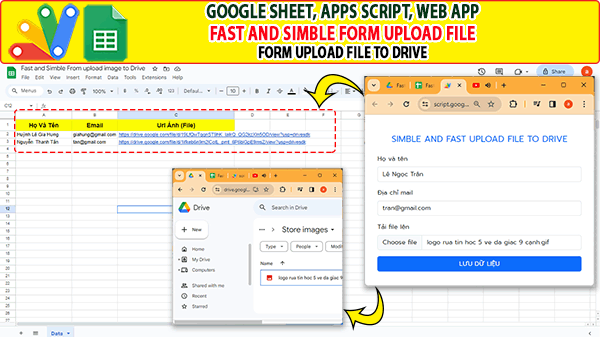
Google sheet App script, Simble and Fast Form upload file to Drive – Form tải tệp nhanh lên Drive. Với project này bạn dễ dàng tạo form entry và upload file, dễ dàng lựa chọn vị trí cột để chứa link. Dưới đây là code và video hướng dẫn, mời bạn tham khảo.
Xem các proeject excel ứng dụng khác.
- Giới thiệu Web Manager – Giải pháp Quản lý Liên kết Tập trung Thông minh
- Tạo form online Hướng dẫn sử dụng Công cụ Load bảng dữ liệu
- TẠO FORM ONLINE – TÙY BIẾN GIAO DIỆN ĐỈNH CAO & XUẤT CODE THÔNG MINH! 🎉
- Bài tập thực hành Msword
- Giới thiệu Ứng dụng Khảo sát và Vẽ đồ thị Hàm số Tự động
- Google sheet Webapp Hệ thống Gửi và Phê duyệt Hỗ trợ file Pdf Xem và đính chữ ký
- Form Builder | Trình tạo form nhập liệu nhanh chóng – Bản V1
- Appscript Webapp | Kéo thả các Items theo 2 chiều Dọc – Ngang, Ứng dụng sắp xếp chu trình công việc
- GOOGLE SHEET WEBAPP TRA CỨU 34 TỈNH THÀNH VIỆT NAM MỚI NHẤT (SÁP NHẬP 2025)
- Quản Lý Tài Chính Cá Nhân Hiệu Quả Với Web App Google Apps Script
Mã code “Code.gs”
function doGet() {
  return HtmlService.createTemplateFromFile("index")
    .evaluate()
    .addMetaTag('viewport', 'width=device-width, initial-scale=1')
    .setXFrameOptionsMode(HtmlService.XFrameOptionsMode.ALLOWALL)
}

function saveFile(e) {
  let folder = DriveApp.getFolderById('1_X9X8Pgq1On1e-_JLJjxKDjDg1Ck40BS')
  var blob = Utilities.newBlob(e.bytes, e.mimeType, e.filename);
  fileUrl = folder.createFile(blob).getUrl()
  ss.getRange(ss.getLastRow()+1,4).setValue(fileUrl)
  return 'Tệp được tải lên thành công!'
}

let ss = SpreadsheetApp.getActiveSpreadsheet().getSheetByName('Data')
function saveData(obj){
ss.getRange(ss.getLastRow(),1,1,3).setValues([[obj.fname, obj.phone, obj.email]])
}
Code “index.html”
<!doctype html>
<html lang="en">

<head>
  <meta charset="utf-8">
  <meta name="viewport" content="width=device-width, initial-scale=1">
  <title>Bootstrap demo</title>
  <link href="https://cdn.jsdelivr.net/npm/bootstrap@5.3.2/dist/css/bootstrap.min.css" rel="stylesheet"
    integrity="sha384-T3c6CoIi6uLrA9TneNEoa7RxnatzjcDSCmG1MXxSR1GAsXEV/Dwwykc2MPK8M2HN" crossorigin="anonymous">
  <style>
    @import url('https://fonts.googleapis.com/css2?family=Prompt&display=swap');

    * {
      font-family: 'Prompt', sans-serif;
    }
  </style>
</head>

<body>
  <div class="container d-flex align-items-center justify-content-center mt-5">
    <form class="row g-3" id="myForm" onsubmit="submitForm(this)">
      <h4 class="text-primary text-center">SIMBLE AND FAST UPLOAD FILE TO DRIVE</h4>

       <div class="col-md-4 offset-md-4">
        <label for="formFile" class="form-label">Tải file lên</label>
        <input id="file" class="form-control" type="file" onchange="saveFile(this)" required/>
      </div>

      <div class="col-md-4 offset-md-4">
        <label for="fname" class="form-label">Họ và tên</label>
        <input type="text" class="form-control" id="fname" name="fname" required>
      </div>

      <div class="col-md-4 offset-md-4">
        <label for="fname" class="form-label">Số điện thoại</label>
        <input type="text" class="form-control" id="phone" name="phone" required>
      </div>

      <div class="col-md-4 offset-md-4">
        <label for="inputPassword4" class="form-label">Địa chỉ mail</label>
        <input type="email" class="form-control" id="email" name="email" required>
      </div>

      <div class="col-md-4 offset-md-4">
        <button type="submit" class="btn btn-primary w-100">LƯU DỮ LIỆU</button>
      </div>
    </form>
  </div>

  <script>

 function saveFile(f) {
      const file = f.files[0];
      const fr = new FileReader();
      fr.onload = function (e) {
        const obj = {
          filename: file.name,
          mimeType: file.type,
          bytes: [...new Int8Array(e.target.result)]
        };
        google.script.run.withSuccessHandler(e => console.log(e)).saveFile(obj);
      };
      fr.readAsArrayBuffer(file);
    }

    function submitForm(obj){
        event.preventDefault()
        Swal.fire({title:"loading.."})
        Swal.showLoading()
        google.script.run.withSuccessHandler(()=>{
          Swal.fire({
            position: "center",
            icon: "success",
            title: "Dữ liệu được ghi thành công!",
            showConfirmButton: false,
            timer: 1500
          });
          document.getElementById('myForm').reset()
        }).saveData(obj);
    }

  </script>

  <script src="https://cdn.jsdelivr.net/npm/sweetalert2@11"></script>
</body>

</html>
Video hướng dẫn
