


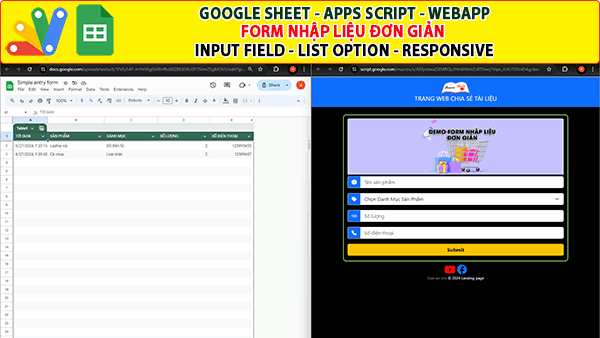
Giáo án link chia sẻ đến các bạn tiếp về Google sheet Apps script Webapp Form nhập liệu đơn giản- Input field, List option, responsive. Trong form nhập liệu này, bạn có 2 loại trường là field input và List option. Form có giao diện responsive theo màng hình thiết bị. Dưới đây là link video hướng dẫn trên youtube và code apps script để bạn tham khảo.
||Tìm rất nhiều project excel, google sheet tại đây
Các project excel ngẫu nhiên:
- Giới thiệu Web Manager – Giải pháp Quản lý Liên kết Tập trung Thông minh
- Tạo form online Hướng dẫn sử dụng Công cụ Load bảng dữ liệu
- TẠO FORM ONLINE – TÙY BIẾN GIAO DIỆN ĐỈNH CAO & XUẤT CODE THÔNG MINH! 🎉
- Bài tập thực hành Msword
- Giới thiệu Ứng dụng Khảo sát và Vẽ đồ thị Hàm số Tự động
- Google sheet Webapp Hệ thống Gửi và Phê duyệt Hỗ trợ file Pdf Xem và đính chữ ký
- Form Builder | Trình tạo form nhập liệu nhanh chóng – Bản V1
- Appscript Webapp | Kéo thả các Items theo 2 chiều Dọc – Ngang, Ứng dụng sắp xếp chu trình công việc
- GOOGLE SHEET WEBAPP TRA CỨU 34 TỈNH THÀNH VIỆT NAM MỚI NHẤT (SÁP NHẬP 2025)
- Quản Lý Tài Chính Cá Nhân Hiệu Quả Với Web App Google Apps Script
Code trang “Code.gs”
/**
 * This web app uses the html5-qrcode library from GitHub: https://github.com/mebjas/html5-qrcode.
 * The html5-qrcode library is used to scan QR codes from the user's webcam.
 */

//Constants
const DATASHEET = "Data";
function doGet() {
  let template = HtmlService.createTemplateFromFile('Index');
  let html = template.evaluate().setTitle('SIMPLE ENTRY FORM');

  html.setXFrameOptionsMode(HtmlService.XFrameOptionsMode.ALLOWALL);
  html.addMetaTag('viewport', 'width=device-width, initial-scale=1');
  return html;
}


function processForm(formObject) {
  const ss = SpreadsheetApp.getActive();
  const dataSheet = ss.getSheetByName(DATASHEET);

  dataSheet.appendRow([
    new Date().toLocaleString(),
    formObject.product_name,
    formObject.product_category,
    formObject.quantity,
    formObject.price,
    formObject.productCode
  ]);
}

/**
 * INCLUDE HTML PARTS, EG. JAVASCRIPT, CSS, OTHER HTML FILES
 */
function include(filename) {
  return HtmlService.createHtmlOutputFromFile(filename).getContent();
}
Code trang “Index.html”
<!doctype html>
<html lang="en">
<head>
<!-- Required meta tags -->
<meta charset="utf-8">
<meta name="viewport" content="width=device-width, initial-scale=1, shrink-to-fit=no">
<link rel="stylesheet" href="https://cdn.jsdelivr.net/npm/bootstrap-icons@1.9.1/font/bootstrap-icons.css">
<link href="https://cdn.jsdelivr.net/npm/bootstrap@5.3.0-alpha3/dist/css/bootstrap.min.css" rel="stylesheet"
integrity="sha384-KK94CHFLLe+nY2dmCWGMq91rCGa5gtU4mk92HdvYe+M/SXH301p5ILy+dN9+nJOZ" crossorigin="anonymous">
<link rel="stylesheet" href="https://cdnjs.cloudflare.com/ajax/libs/font-awesome/6.3.0/css/all.min.css" />
<style>
#qr-reader {
/* Default width for all devices */
width: 100%;
box-sizing: border-box;
/* Include padding and border in width calculation */
}
@media only screen and (max-width: 600px) {
#qr-reader {
width: 100%;
}
}
</style>
</head>
<body class="bg-black text-light">
<nav class="navbar sticky-top navbar-dark bg-primary">
<div class="container-fluid " >
<a class="navbar-brand mx-auto" href="https://giaoan.link" target="_blank" style="text-align: center"><span><img src="https://giaoan.link/wp-content/uploads/2021/10/logo-giaoan-2021v2.gif" width="90px"></span><br><span>TRANG WEB CHIA SẺ TÀI LIỆU</span></a>
</div>
</nav>
<br>
<div class="container" style="border: solid 2px #aafe7d; border-radius: 10px" >
<?!= include('Form'); ?>
</div>
<div style="height: 10px;"></div>
<div class="text-center"><a href="https://www.youtube.com/@truyenhinhcamau69" target="_blank"><i style="color:red" class="fa-brands fa-youtube fa-2x"></i></a> <a href="https://www.facebook.com/ctvcamau" target="_blank"><i class="fa-brands fa-facebook fa-2x"></i></a></div><center style="font-size:12px;"><a style="color:gray;text-decoration:none" href="https://ctvcamau.vn" target="_blank"> Đài PT-TH Cà Mau<a/> © 2024 Landing page</center></div>
<?!= include('JavaScript'); ?>
</body>
</html>Code trang “Form.html”
<div id="reader-results"></div>
<form id="InventoryForm" onsubmit="handleFormSubmit(this)">
  <div style="height: 10px;"></div>
  <img src="https://lh3.googleusercontent.com/pw/AP1GczOPmlGr7xjKzQLc4xV908OzSrQRVtIZVWs4MXUzuzha72BTzgpl45e_yPZQY4Rrl8-jUy5AMVrNZn6zZsLKJ3RL30uuzw-iQHjX0xOFa7JWnX3loL8=w2400" width="100%"/>
  <div style="height: 5px;"></div>
  <div class="mb-3 input-group">
    <span class="input-group-text bg-primary text-white"><i class="bi bi-box-fill"></i></span>
    <input type="text" class="form-control" id="productName" name="product_name" placeholder="Tên sản phẩm">
  </div>
  <div class="mb-3 input-group">
    <!-- <label for="productCategory" class="form-label">Product Category:</label> -->
    <span class="input-group-text bg-primary text-white"><i class="bi bi-tags-fill"></i></span>
    <select class="form-select" id="productCategory" name="product_category" required>
          <option disabled selected>Chọn Danh Mục Sản Phẩm</option>
          <option value="Đồ điện tử">Đồ điện tử</option>
          <option value="Thời trang">Thời trang</option>
          <option value="Sách">Sách</option>
          <option value="Loại khác">Loại khác...</option>
        </select>
  </div>
  <div class="mb-3 input-group">
    <span class="input-group-text bg-primary text-white"><i class="bi bi-123"></i></span>
    <input type="number" class="form-control" id="quantity" name="quantity" placeholder="Số lượng" required>
  </div>
  <div class="mb-3 input-group">
    <span class="input-group-text bg-primary text-white"><i class="bi bi-telephone-fill"></i></span>
    <input type="number" class="form-control" id="price" name="price" placeholder="Số điện thoại" required>
  </div>
  <button type="submit" class="btn btn-warning mb-3 w-100 fw-bold">Submit</button>
</form>
Code trang “Javascript.html”
<script>
  window.addEventListener("load", functionInit, true);

  //Initialize functions onload
  function functionInit(){
    preventFormSubmit();
  };

  // Prevent forms default behaviour (Prevent reloading the page)
  function preventFormSubmit() {
    var forms = document.querySelectorAll('form');
    for (var i = 0; i < forms.length; i++) {
      forms[i].addEventListener('submit', function(event) {
      event.preventDefault();
      });
    }
  }

  /**
   * The handleFormSubmit() function passes the formObject to the processForm
   * function in the Code.gs file
   */
  function handleFormSubmit(formObject) {
    // Get the Data from the div
    google.script.run.processForm(formObject);
    const resultContainer = document.getElementById('reader-results');
    resultContainer.innerHTML = '';
    document.getElementById("InventoryForm").reset();
  }
</script>