

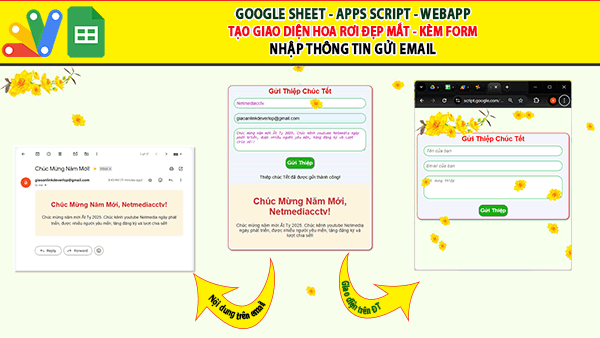
Giaoan.link chia sẻ đến các bạn một project trên apps script về “Hiệu ứng hoa rơi – Form nhập liệu Gửi nội dung đến email“. Bạn có thể ứng dụng nó trên website hoặc blog. Hiệu ứng gồm một cành hoa và có nhiều bông hoa lớn nhỏ ngẫu nhiên rơi khác nhau. Bên dưới là code, bạn có thể copy và thử cho website nhé.

Bạn tìm thêm nhiều project khác tại đây
Các project ngẫu nhiên khác:
- Giới thiệu Web Manager – Giải pháp Quản lý Liên kết Tập trung Thông minh
- Tạo form online Hướng dẫn sử dụng Công cụ Load bảng dữ liệu
- TẠO FORM ONLINE – TÙY BIẾN GIAO DIỆN ĐỈNH CAO & XUẤT CODE THÔNG MINH! 🎉
- Bài tập thực hành Msword
- Giới thiệu Ứng dụng Khảo sát và Vẽ đồ thị Hàm số Tự động
- Google sheet Webapp Hệ thống Gửi và Phê duyệt Hỗ trợ file Pdf Xem và đính chữ ký
- Form Builder | Trình tạo form nhập liệu nhanh chóng – Bản V1
- Appscript Webapp | Kéo thả các Items theo 2 chiều Dọc – Ngang, Ứng dụng sắp xếp chu trình công việc
- GOOGLE SHEET WEBAPP TRA CỨU 34 TỈNH THÀNH VIỆT NAM MỚI NHẤT (SÁP NHẬP 2025)
- Quản Lý Tài Chính Cá Nhân Hiệu Quả Với Web App Google Apps Script
Code trang “code.gs”
//Display HTML page
function doGet(request) {
  let html = HtmlService.createTemplateFromFile('Index').evaluate().setXFrameOptionsMode(HtmlService.XFrameOptionsMode.ALLOWALL);
  let htmlOutput = HtmlService.createHtmlOutput(html).setXFrameOptionsMode(HtmlService.XFrameOptionsMode.ALLOWALL);
  htmlOutput.addMetaTag('viewport', 'width=device-width, initial-scale=1');
  return htmlOutput;
}

function sendGreetingCard(form) {
  var emailAddress = form.email;
  var subject = "Chúc Mừng Năm Mới!";
  var htmlBody = `
    <html>
      <head>
        <style>
          .card {
            border: 2px solid #f3f3f3;
            border-radius: 10px;
            padding: 20px;
            text-align: center;
            background-color: #fff3e0;
          }
          .card h1 {
            color: #d32f2f;
          }
          .card p {
            font-size: 16px;
            color: #333;
          }
        </style>
      </head>
      <body>
        <div class="card">
          <h1>Chúc Mừng Năm Mới, ${form.name}!</h1>
          <p>${form.message}</p>
        </div>
      </body>
    </html>
  `;

  MailApp.sendEmail({
    to: emailAddress,
    subject: subject,
    htmlBody: htmlBody
  });

  return "Thiệp chúc Tết đã được gửi thành công!";
}
Code trang “index.html”
<!DOCTYPE html>
<html>
<head>
  <base target="_top">
  <style>
    /* CSS cho giao diện */
    body {
      font-family: Arial, sans-serif;
      text-align: center;
      background-color: #f7ffed;
      margin: 0;
      padding: 0;
    }
    .container {
      margin-top: 50px;
    }
    .card-preview {
      border: 2px solid #f3f3f3;
      border-radius: 10px;
      padding: 20px;
      text-align: center;
      background-color: #fff3e0;
      display: inline-block;
    }
    .card-preview h1 {
      color: #d32f2f;
    }
    .card-preview p {
      font-size: 16px;
      color: #333;
    }
    /* CSS cho cành mai */
    .branch {
      position: fixed;
      top: 0;
      left: 0;
      z-index: 1000;
      width: 400px; /* Kích thước cành mai */
      height: auto;
    }
    /* CSS cho hiệu ứng hoa rơi */
    .falling-flowers {
      position: fixed;
      top: 0;
      left: 0;
      width: 100%;
      height: 100%;
      pointer-events: none;
      z-index: 999;
    }
    .flower {
      position: absolute;
      width: 30px; /* Kích thước mặc định */
      height: 30px; /* Kích thước mặc định */
      background-image: url('https://drive.google.com/thumbnail?id=1p0YHfMSF9eVV-HSC63R1SxLO_SmjUyZs&sz=w1000');
      background-size: contain;
      background-repeat: no-repeat;
      animation: fall linear infinite;
    }

    .card-preview {
    display: none; /* Ẩn khung card-preview ban đầu */
  }
  .card-preview.visible {
    display: inline-block; /* Hiển thị khung card-preview khi có nội dung */
  }

    .div-body{
      width: 500px;
      border: 1px solid red;
      border-radius: 15px;
      box-shadow: 2px 2px 5px grey;
      background-color: #f0f8ff;
      padding: 5px;
      margin-left: auto;
      margin-right: auto;
    }
    input, textarea{
        border: 1px solid #17ba3a;
        border-radius: 20px;
        width: 90%;
        color: #e909f1;
        font-size: 1em;
        padding: 8px;
        outline: none;

    }
    input:focus{
      border: 1px solid #ffb400;
    }

    textarea:focus{
      border: 1px solid #ffb400;
    }
    textarea, input::placeholder{
      font-size: 1em;
      font-style: italic;
    }

    @keyframes fall {
      from { transform: translateY(-100px) rotate(0deg); }
      to { transform: translateY(100vh) rotate(360deg); }
    }
    .btn{
      font-size: 1.2em;
      font-weight: bold;
      color: white;
      padding: 8px 5px;
      border:1px solid grey;
      border-radius: 15px;
      background-color: #1daf15;
      box-shadow: 1px 1px 2px grey;
      cursor: pointer;
      margin-bottom: 5px;
    }

    .btn:hover{
      box-shadow: 2px 2px 5px grey;
    }
    .title-1{
      font-size: 1.5em;
      font-weight: bold;
      color: red;
      margin-bottom: 10px;
    }
    @media(max-width: 800px){
      body {
      margin-top: 70px;
    }
    .div-body{
      width: 95%;
    }
    }
  </style>
</head>
<body>
  <div class="container">.
    <div class="div-body">
        <div class="title-1">Gửi Thiệp Chúc Tết</div>
        <form id="greetingForm">
          <input type="text" id="name" placeholder="Tên của bạn" required><br><br>
          <input type="email" id="email" placeholder="Email của bạn" required><br><br>
          <textarea id="message" placeholder="Nội dung thiệp" rows="4" required></textarea><br><br>
          <button class="btn" type="button" onclick="sendCard()">Gửi Thiệp</button>
        </form>
        <div id="result"></div>
        <div class="card-preview" id="cardPreview">
          <h1 id="cardName"></h1>
          <p id="cardMessage"></p>
        </div>
  </div>
  </div>

  <!-- Cành mai -->
  <img src="https://drive.google.com/thumbnail?id=1cc6iaVaGrhH9CH2wghY1nOGtQr2ealR4&sz=w1000" class="branch" alt="Cành Mai">

  <!-- Hiệu ứng hoa rơi -->
  <div class="falling-flowers" id="fallingFlowers"></div>

  <script>
      function sendCard() {
    var form = {
      name: document.getElementById('name').value,
      email: document.getElementById('email').value,
      message: document.getElementById('message').value
    };

    document.getElementById('result').innerHTML = '<p>Đang gửi thiệp...</p>';

    // Cập nhật preview thiệp
    var cardPreview = document.getElementById('cardPreview');
    document.getElementById('cardName').innerText = 'Chúc Mừng Năm Mới, ' + form.name + '!';
    document.getElementById('cardMessage').innerText = form.message;

    // Hiển thị khung card-preview
    cardPreview.classList.add('visible');

    google.script.run.withSuccessHandler(function(response) {
      document.getElementById('result').innerHTML = '<p>' + response + '</p>';
    }).sendGreetingCard(form);
  }

    // Tạo hiệu ứng hoa rơi
    function createFallingFlowers() {
      var fallingFlowers = document.getElementById('fallingFlowers');
      for (var i = 0; i < 10; i++) {
        var flower = document.createElement('div');
        flower.className = 'flower';
        flower.style.left = Math.random() * 100 + 'vw';
        flower.style.width = flower.style.height = (Math.random() * 20 + 30) + 'px'; // Kích thước ngẫu nhiên từ 30px đến 50px
        flower.style.animationDuration = (Math.random() * 5 + 5) + 's'; // Thời gian rơi từ 5-10 giây
        flower.style.animationDelay = Math.random() * 5 + 's'; // Độ trễ rơi ngẫu nhiên
        fallingFlowers.appendChild(flower);
      }
    }

    document.addEventListener('DOMContentLoaded', createFallingFlowers);
  </script>
</body>
</html>