

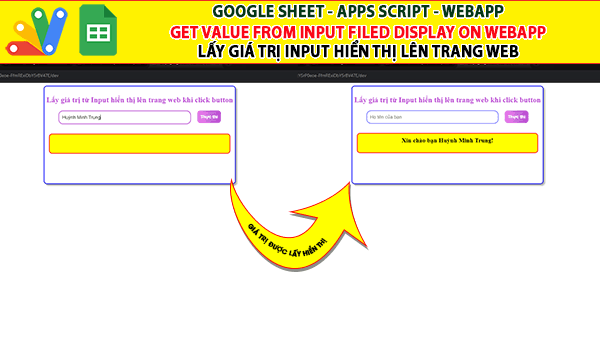
Giaoan.link chia sẻ đến các bạn một project về “Apps script Webapp | Lấy giá trị Input hiển thị lên – Web Get value input field display on web” khá thú vị. Đây là một ứng dụng nhỏ và bạn có thể thêm nó vào các form nhập liệu của mình.
Chức năng của nó là sẽ lấy giá trị của một trường input để hiển thị ngược lại trên một trường khác của webapp. Dưới đây là code apps script và video demo trên youtube.

Bạn dễ dàn tìm kiếm các project apps script, googlesheet ở đây.
Các project googleapps script ngẫu nhiên
- Google sheet, apps script, webapp “Bé Vui Phép Nhân” – Công Cụ Luyện Toán Trực Quan Cho Học Sinh Tiểu Học
- Google sheet webapp Bé Vui Học Toán – Ứng dụng Luyện Phép Chia Trực Quan Cho Học Sinh Lớp 3
- Googlesheet appscript – Hệ Thống Đăng Ký Hồ Sơ Trực Tuyến (Online Registration Portal)
- [Share Code] Biến Google Sheet thành Web App Tra Cứu Dự Án & Tài Liệu (Miễn Phí Hosting)
- Hệ Thống Quản Lý Phòng Game “Cloud-Native” với Google Apps Script
- Hệ Thống Điều Phối & Quản Lý Đội Xe Thông Minh (Web App)
- Biến Google Sheets thành Dashboard “Viễn Tưởng” phong cách Cyberpunk
- Google appscript | Hệ thống tìm thông tin và nhập liệu 2 Form-Tự động truy vấn và upload nhiều files
- Google sheet Webapp|Giáo viên chủ nhiệm quản lý điểm, thống kê xếp hạng chia sẻ cho phụ huynh
- Google sheet Webapp | Bản nâng cấp Tìm và Load Thông tin sinh viên có Hình ảnh và Bảng kết quả thi
Mã apps script trang “Code.gs”
function doGet(){
  return HtmlService.createTemplateFromFile("index")
  .evaluate()
}
Mã apps script trang “Index.html”
<!DOCTYPE html>
<html>
  <head>
    <base target="_top">
    <style>

.container{
  border: 2px solid blue;
  border-radius: 10px;
  width: 600px;
  height: 300px;
  padding: 5px;
  margin-left: auto;
  margin-right: auto;
  box-shadow: 5px 5px 5px #aaaaaa;
}

.fields{
  display: flex;
  justify-content: center;
  flex-wrap: wrap;
  gap: 20px;
}


h2{
  color: #BA55D3;
  text-align: center;
  text-shadow: -1px 0 #fff, 0 1px #fff, 1px 0 #fff, 0 -1px #fff;
  padding-top: 5px;
}

.input-field{
  width: 400px;
  height: 20px;
  font-size: 15px;
  border: 1px solid blue;
  outline: none;
  border-radius: 15px;
  padding: 10px;
}
.contact-inputs:focus{
  border: 2px solid #000;
}
.input-field:focus{
  border: 2px solid #BA55D3;
}

button{
  height: 40px;
  padding: 10px 10px;
  border: none;
  border-radius: 10px;
  font-size: 14px;
  font-weight: bold;
  color: #fff;
  background-image: linear-gradient(270deg,#BA55D3,#EE82EE);
  cursor: pointer;
}

p{
  width: 100%;
  font-size: 20px;
  font-weight: bold;
  text-align: center;
  height: 40px;
  border: 2px solid red;
  border-radius: 10px;
  background-color: yellow;
  padding: 10px;
  margin: 10px;
}
</style>
  </head>
  <body>


    <div class="container">
      <h2>Lấy giá trị từ Input hiển thị lên trang web khi click button</h2>
      <div class="fields">
        <input class="input-field" name="input1" id="input1" type="text" placeholder="Họ tên của bạn">
        <button id="btn1">Thực thi</button>
        <p  id="message"> </p>
      </div>

    </div>

   <script>
      const input1 = document.getElementById("input1");
      const btn1 = document.getElementById("btn1");

      function sendmessage(){
        document.getElementById("message").innerHTML = 'Xin chào bạn '+input1.value+ '!';
        input1.value = "";
      }
      btn1.addEventListener("click",sendmessage);
    </script>
  </body>
</html>