
Tạo hóa đơn trên Google sheet – Gửi email đính kèm hóa đơn pdf – Quản lý url hóa đơn trên danh sách
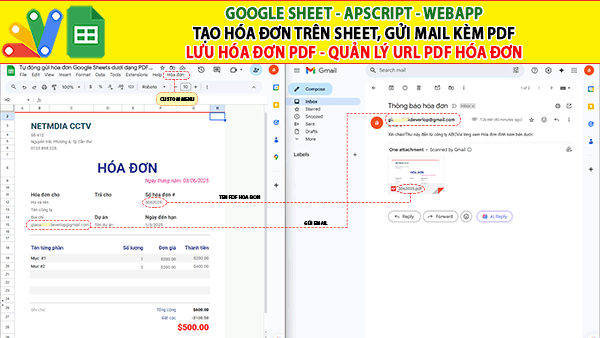
Giaoan.link chia sẻ đến các bạn một project mới của kênh youtube netmediacctv về “Tạo hóa đơn trên Google sheet – Gửi email đính kèm hóa đơn pdf – Quản lý url hóa đơn trên danh sách“. Một số điểm mới ở project này:
- Đây là ứng dụng hóa đơn được thiết kế trên sheet
- Có menu cá nhân hóa để chọn tạo và gửi hóa đơn dạng pdf đính kèm.
- Mail được gửi dựa vào địa chỉ email điền trên hóa đơn.
- Hóa đơn được tạo thành một bản sao pdf với tên file là tên của số hóa đơn được điền trên giao diện ở trên.
- Có một sheet riêng để lập danh sách tên và các url của file pdf hóa đơn.
Các project ứng dụng trên excel hoặc google sheet khác:
- Giới thiệu Web Manager – Giải pháp Quản lý Liên kết Tập trung Thông minh
- Tạo form online Hướng dẫn sử dụng Công cụ Load bảng dữ liệu
- TẠO FORM ONLINE – TÙY BIẾN GIAO DIỆN ĐỈNH CAO & XUẤT CODE THÔNG MINH! 🎉
- Bài tập thực hành Msword
- Giới thiệu Ứng dụng Khảo sát và Vẽ đồ thị Hàm số Tự động
- Google sheet Webapp Hệ thống Gửi và Phê duyệt Hỗ trợ file Pdf Xem và đính chữ ký
- Form Builder | Trình tạo form nhập liệu nhanh chóng – Bản V1
- Appscript Webapp | Kéo thả các Items theo 2 chiều Dọc – Ngang, Ứng dụng sắp xếp chu trình công việc
- GOOGLE SHEET WEBAPP TRA CỨU 34 TỈNH THÀNH VIỆT NAM MỚI NHẤT (SÁP NHẬP 2025)
- Quản Lý Tài Chính Cá Nhân Hiệu Quả Với Web App Google Apps Script
Mã appscript của project này
function onOpen() {
  let ui = SpreadsheetApp.getUi();

  ui.createMenu("Hóa đơn")
    .addItem("Gửi mail kèm PDF","emailInvoice")
    .addToUi();
}
const INVOICE_SHEET_NAME = 'Hoa_don';
const INVOICE_RANGE = 'A1:H29';
const EMAIL_SUBJECT = 'Thông báo hóa đơn';
const EMAIL_BODY = 'Xin chào!\rThư này đến từ công ty ABC\rVui lòng xem Hóa đơn đính kèm bên dưới.';
const INVOICE_NO_RANGE = "F12:G12";
const INVOICE_RECORD_SHEET_NAME = "Danh_sach_hoa_don";
const EMAIL_ADDRESS_RANGE = 'B15:C15';

/**
 * Send email with invoice PDF as an attachment
 */
function emailInvoice() {
  try {
    const ss = SpreadsheetApp.getActive();
    const invoiceSheet = ss.getSheetByName(INVOICE_SHEET_NAME);
    const recipientEmail = invoiceSheet.getRange(EMAIL_ADDRESS_RANGE).getValue();

    // Ensure spreadsheet changes are reflected
    SpreadsheetApp.flush();
    Utilities.sleep(500); // Using to offset any potential latency in creating .pdf

    const pdfFile = createPDF();

    //Send the email with PDF attachment
    GmailApp.sendEmail(recipientEmail, EMAIL_SUBJECT, EMAIL_BODY, {
      attachments: [pdfFile.getAs(MimeType.PDF)]
    });

    //Create a record in Google Sheets that includes a link to the file saved in Drive.
    createRecord(pdfFile);
  } catch (error) {
    Logger.log("Lỗi trong khi xử lí hóa đơn: " + error.message);
    SpreadsheetApp.getUi().alert("Có lỗi trong khi xử lí hóa đơn: " + error.message);
  }
}

/**
 * Create a new record in Google Sheets,with File Name,URL & Created Date
 * @param {file object} pdfFile as a blob
 */
function createRecord(pdfFile) {
  try {
    const ss = SpreadsheetApp.getActive();
    const recordSheet = ss.getSheetByName(INVOICE_RECORD_SHEET_NAME);
    const fileName = pdfFile.getName();
    const url = pdfFile.getUrl();
    const dateCreated = new Date().toLocaleString();

    //Append Record
    recordSheet.appendRow([fileName, url, dateCreated]);
  } catch (error) {
    Logger.log("Lỗi khi tạo bản ghi danh sách hóa đơn: " + error.message);
    SpreadsheetApp.getUi().alert("Lỗi khi tạo bản ghi danh sách hóa đơn: " + error.message);
  }
}


/**
 * Create and save the invoice as PDF in the Google Drive folder
 */
function createPDF() {
  try {
    const ss = SpreadsheetApp.getActive();
    const ssId = ss.getId();
    const invoiceSheet = ss.getSheetByName(INVOICE_SHEET_NAME);
    const invoiceNo = invoiceSheet.getRange(INVOICE_NO_RANGE).getValue();
    const pdfName = invoiceNo;
    const folderId = getOrCreateInvoicesFolder(ssId);
    const folder = DriveApp.getFolderById(folderId);

    const url = "https://docs.google.com/spreadsheets/d/" + ssId + "/export" +
      "?exportFormat=pdf&" +
      "format=pdf&" +
      "size=A4&" +
      "fzr=true&" +
      "portrait=true&" +
      "fitw=true&" +
      "gridlines=false&" +
      "printtitle=false&" +
      "top_margin=0.5&" +
      "bottom_margin=0.25&" +
      "left_margin=0.5&" +
      "right_margin=0.5&" +
      "sheetnames=false&" +
      "pagenum=UNDEFINED&" +
      "attachment=true&" +
      "gid=" + invoiceSheet.getSheetId() + "&" +
      "range=" + INVOICE_RANGE;

    const params = { method: "GET", headers: { "authorization": "Bearer " + ScriptApp.getOAuthToken() } };
    const blob = UrlFetchApp.fetch(url, params).getBlob().setName(pdfName + '.pdf');

    const pdfFile = folder.createFile(blob);
    return pdfFile;
  } catch (error) {
    Logger.log("Có lỗi xảy ra khi tạo file PDF: " + error.message);
    SpreadsheetApp.getUi().alert("Có lỗi xảy ra khi tạo file PDF " + error.message);
  }
}

/**
 * Checks for a folder named "Hoadon_PDF" within the same parent folder as the specified spreadsheet.
 * If the folder doesn't exist, it creates it.
 *
 * @param {string} ssId The ID of the Google Sheets spreadsheet.
 * @returns {string} The ID of the "Hoadon_PDF" folder.
 */
function getOrCreateInvoicesFolder(ssId) {
  // Get the folder containing the spreadsheet
  var parentFolder = DriveApp.getFileById(ssId).getParents().next();

  // Search for the "Hoadon_PDF" folder
  var folders = parentFolder.getFoldersByName("Hoadon_PDF");

  if (folders.hasNext()) {
    // Folder exists
    var invoiceFolder = folders.next();
    var folderId = invoiceFolder.getId();
  } else {
    // Folder doesn't exist
    var invoiceFolder = parentFolder.createFolder("Hoadon_PDF");
    var folderId = invoiceFolder.getId();
  }

  return folderId;
}