
Google sheet Apps Script | Cập nhật Data từ Google sheet lên Form HTML KHÔNG Refresh trình duyệt
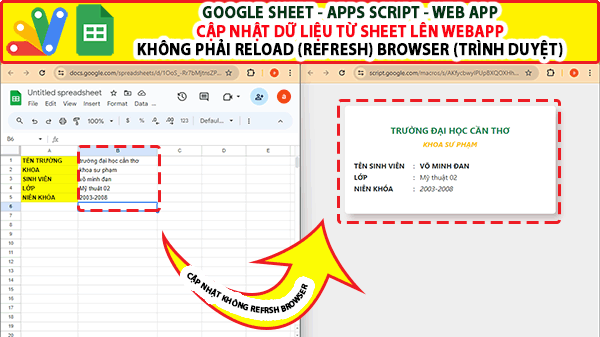
Giaoan.link chia sẻ tiếp đến bạn về Google sheet Apps Script , với project “Cập nhật Data từ Google sheet lên Form HTML KHÔNG Refresh trình duyệt“. Ở project trước, mình đã chia sẻ đến bạn project về “Json Fetch data từ google sheet lên website” – đây là một cách load bảng dữ liệu lên website, tuy nhiên phải reload lại tragn thì dữ liệu mới cập nhật mới được load lên. Trong khi ở project mới này dữ liệu bạn cập nhật ở google sheet thì âm thầm tự động cập nhật – không phải reload website. Dưới đây là code appscript và video hướng dẫn cụ thể.
Các bài học excel khác:
- GOOGLE SHEET WEBAPP TRA CỨU 34 TỈNH THÀNH VIỆT NAM MỚI NHẤT (SÁP NHẬP 2025)
- Quản Lý Tài Chính Cá Nhân Hiệu Quả Với Web App Google Apps Script
- Google sheet, apps script, webapp “Bé Vui Phép Nhân” – Công Cụ Luyện Toán Trực Quan Cho Học Sinh Tiểu Học
- Google sheet webapp Bé Vui Học Toán – Ứng dụng Luyện Phép Chia Trực Quan Cho Học Sinh Lớp 3
- Googlesheet appscript – Hệ Thống Đăng Ký Hồ Sơ Trực Tuyến (Online Registration Portal)
- [Share Code] Biến Google Sheet thành Web App Tra Cứu Dự Án & Tài Liệu (Miễn Phí Hosting)
- Hệ Thống Quản Lý Phòng Game “Cloud-Native” với Google Apps Script
- Hệ Thống Điều Phối & Quản Lý Đội Xe Thông Minh (Web App)
- Biến Google Sheets thành Dashboard “Viễn Tưởng” phong cách Cyberpunk
- Google appscript | Hệ thống tìm thông tin và nhập liệu 2 Form-Tự động truy vấn và upload nhiều files
Code trang “Code.gs”
function doGet(e) {
  return HtmlService.createTemplateFromFile("form").evaluate()
  .setTitle("Update data without refresh")
  .addMetaTag('viewport', 'width=device-width, initial-scale=1')
  .setXFrameOptionsMode(HtmlService.XFrameOptionsMode.ALLOWALL);
}

function setAutomatically() {
  let ss = SpreadsheetApp.getActiveSpreadsheet();
  let sheet = ss.getSheetByName('Data');
  let data = sheet.getRange('B1:B5').getValues().map(d =>d[0])  ;
  return data;
  }
Code mã “index.html”
<!DOCTYPE html>
<html>
<head>
  <base target="_top">

  <link href="https://cdn.jsdelivr.net/npm/bootstrap@5.0.0-beta3/dist/css/bootstrap.min.css" rel="stylesheet"
  integrity="sha384-eOJMYsd53ii+scO/bJGFsiCZc+5NDVN2yr8+0RDqr0Ql0h+rP48ckxlpbzKgwra6" crossorigin="anonymous">

<style>
   body{
     background: #eee;
   }

   .frame{
      box-shadow: 10px 10px 15px rgb(193,182,182), -6px -6px 15px #eee;
      padding: 20px;
      max-width: 480px;
      margin: 40px auto;
      margin-top: 50px;
      border-radius: 7px;
      background: white;
   }

    button {
      text-transform: uppercase;
      transition: transform 80ms ease-in;
      border-radius: 7px;
    }

    button:active {
        transform: scale(0.95);
        color: white
    }

    .btn.focus, .btn:focus {
        outline: 0;
        box-shadow: none!important;
        color: white;
    }

    .btn-info:hover {
      background-color: gold;
      color: white;
      border-color: gold;
    }

    .btn-info {color: white;}

    .box {
        border: 1px solid rgba(0,0,0,0.2);
        padding: 1.5rem;
        margin-left:10px;
        margin-right:10px;
        border-radius: 13px;
        margin: auto;
        width: 100%;
    }

    .inp {
        border:none;
        border-bottom: 1px solid rgba(0,0,0,0.2);
        border-radius: 0px;
        padding: 5px 10px;
        outline: none;
    }

    [placeholder]:focus::-webkit-input-placeholder {
        transition: text-indent 0.4s 0.4s ease;
        text-indent: -100%;
        opacity: 1;
    }

     .inp.focus, .inp:focus {
        outline: 0;
        box-shadow: none!important;
        /* color: green; */
        border-bottom: 1px solid rgba(0,0,0,0.2);
    }
</style>
</head>

<body>

 <div class="container">
  <div class="row frame">

   <h5 id="titles" class="mt-4 text-center text-uppercase text-success fw-bold"></h5>
   <h7 id="sub-titles" class="mb-4 text-center text-uppercase text-warning fw-bold fst-italic"></h7>
<!-- create form element here -->
    <table class="mb-4">
        <tr>
            <td style="font-weight: bold" width="135">TÊN SINH VIÊN</td>
            <td width="15">:</td>
            <td id="data1" class="text-uppercase fw-bold"></td>
        </tr>
        <tr>
            <td style="font-weight: bold" >LỚP</td>
            <td>:</td>
            <td id="data2"></td>
        </tr>
        <tr>
            <td style="font-weight: bold" >NIÊN KHÓA</td>
            <td>:</td>
            <td id="data3" class="fst-italic"></td>
        </tr>
      </table>
<!-- create form until element here -->

  </div>
 </div>
<script src="https://cdn.jsdelivr.net/npm/@popperjs/core@2.9.1/dist/umd/popper.min.js" integrity="sha384-SR1sx49pcuLnqZUnnPwx6FCym0wLsk5JZuNx2bPPENzswTNFaQU1RDvt3wT4gWFG" crossorigin="anonymous"></script>
<script src="https://cdn.jsdelivr.net/npm/bootstrap@5.0.0-beta3/dist/js/bootstrap.min.js" integrity="sha384-j0CNLUeiqtyaRmlzUHCPZ+Gy5fQu0dQ6eZ/xAww941Ai1SxSY+0EQqNXNE6DZiVc" crossorigin="anonymous"></script>
<script>
  document.addEventListener('DOMContentLoaded', function(){
    setInterval(function(){
      let title = document.getElementById('titles');
      let subTitle = document.getElementById('sub-titles');
      let name = document.getElementById('data1');
      let svclass = document.getElementById('data2');
      let classyear = document.getElementById('data3');
      google.script.run
      .withSuccessHandler(data =>{
        title.innerHTML = data[0]
        subTitle.innerHTML = data[1];
        name.innerHTML = data[2];
        svclass.innerHTML = data[3];
        classyear.innerHTML = data[4];
      })
      .setAutomatically();
      } , 2000)
  })
</script>
</body>
</html>